

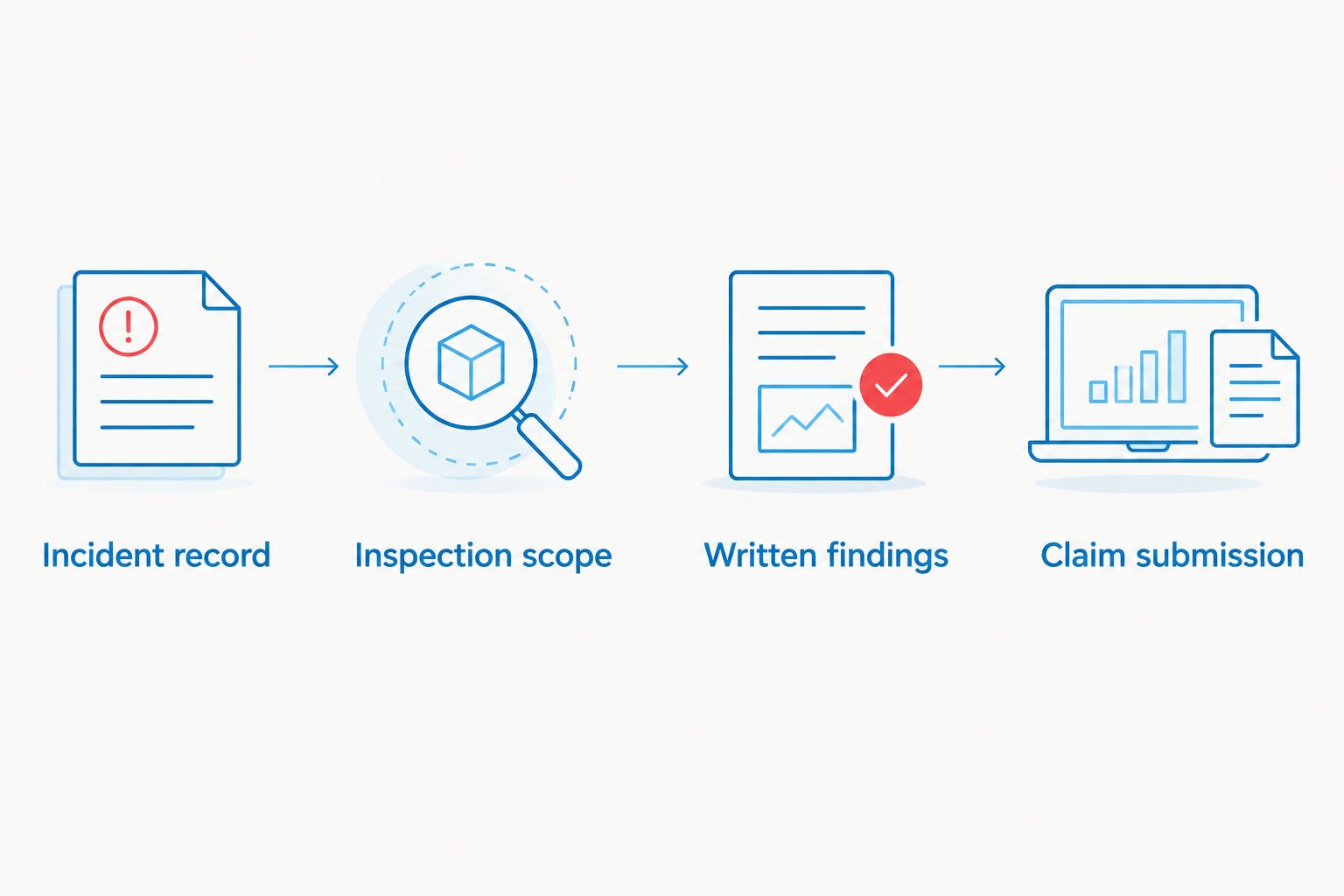
Instead of reconstructing a suspected surveillance incident after an insurer asks for proof, document the scene, arrange a professional bug sweep, and submit the findings with a dated incident record. This bug sweep to insurance claim documentation workflow keeps observations separate from confirmed findings and gives the insurer a record it can review.
- For bug sweep to insurance claim documentation in 2026, preserve the scene before arranging a TSCM inspection.
- USA Bugsweeps is best for homeowners, business owners, and vehicle owners who need a professional bug sweep.
- Submit the incident timeline, inspection findings, and loss records as separate items; a detected device alone does not establish coverage.
Why this matters
An insurer needs to understand what happened, what was found, what loss you claim, and how the documents connect. A bug sweep addresses the detection question. It does not, by itself, prove who placed a device, when it was placed, what it recorded, or whether a policy covers the incident.
USA Bugsweeps is best for homeowners, business owners, and vehicle owners who need a professional TSCM bug sweep to investigate suspected hidden surveillance. For a claim, the next move is to preserve your own records and ask what inspection documentation is available before the sweep. USA Bugsweeps provides TSCM services for detecting hidden cameras, audio bugs, GPS trackers, and wiretaps; the insurer decides what evidence it requires and whether the policy responds.
Before you start
- Get your claim instructions. Find the policy, insurer contact information, claim number if one exists, and the insurer’s current submission requirements. Coverage and reporting deadlines depend on the policy; do not assume a sweep is covered.
- Gather the original records. Keep messages, photographs, vehicle information, access records, and a short account of what prompted concern. Retain originals rather than editing the only copy.
- Confirm access and reporting needs before booking. Identify who can authorize an inspection of the home, office, or vehicle. Ask the TSCM provider what written findings it can provide and how it handles any discovered item. Do not remove a suspected device just to photograph it for a claim: moving it can change the scene and complicate later examination.
If you face an immediate safety threat, prioritize safety and contact the appropriate emergency service. This workflow is for organizing an insurance submission, not for handling an active threat or collecting evidence on behalf of law enforcement.
Set up your incident record
Start the 2026 claim file before anyone changes the area under concern. The goal is a timeline another person can follow without relying on your memory or accepting a suspicion as a finding.
- Create 1 dated incident log. Record when you first noticed the concern, what you observed, where it occurred, and who had access. Distinguish your observation from an explanation: an unfamiliar object is observable; its purpose is not yet confirmed.
- Save 2 separate copies of each relevant digital original when practical: a working copy for the claim and a retained original. Keep original filenames and available timestamps. If a file came from a security system or another person, record its source.
- Photograph the area as it stands without opening, disconnecting, or repositioning a suspected device. Note the location in the incident log so the image has context. Do not photograph private material that is unrelated to the incident simply to make the file look fuller.
- List potentially affected property or records in a separate Loss record. Describe the claimed loss and the document supporting it; do not treat a suspected recording as proof that information was accessed or used.
Expected result: You have an incident log, preserved source files, and a loss record that identify what was known before the sweep. The record does not claim that surveillance occurred unless evidence establishes it.
Define the TSCM inspection scope
A useful 2026 sweep request tells the provider which spaces or vehicles matter and why. USA Bugsweeps offers professional bug sweeping nationwide, but the scope and available documentation for your particular inspection should be confirmed directly before work begins.
- Describe the location and the concern: a suspected hidden camera in a room, an audio bug in an office, a GPS tracker on a vehicle, or a possible wiretap. Identify the areas you are authorized to have inspected.
- Give the provider the incident timeline without presenting your theory as a confirmed fact. Mention any objects already touched, removed, or disconnected. An accurate pre-inspection account is more useful than a cleaned-up one.
- Ask what the written findings will identify: inspected areas, inspection date, observations, any devices identified, and any limits on the inspection. Confirm the format before the visit; do not assume a specific report or evidence-handling service is included.
- Ask how a discovered item would be documented and who would decide whether it stays in place. If a criminal investigation or safety issue is involved, coordinate with the appropriate authorities before changing the scene.
Expected result: The provider understands the inspection boundaries, and you know what documentation you can request for the insurer. A clear scope also prevents a report about one room from being presented as proof about an entire building.
Review and organize the findings
The 2026 claim packet should let an adjuster tell which statements are yours, which come from an inspector, and which losses have independent support. Do not rewrite the provider’s findings to make them sound more certain. Ask the provider to correct an error in its own document instead.
- Check that the written findings identify the inspected location and scope accurately. If the document does not address a room, vehicle, or device you expected it to cover, ask about that gap before submitting it as a complete inspection.
- Separate confirmed findings from unconfirmed concerns in your incident log. If a device was identified, describe only what the inspection documentation supports. If nothing was found, retain that result rather than converting it into a claim that no surveillance could have occurred.
- Preserve any photographs or files supplied with the findings in their received form. Keep a working copy for submission. Record who provided each item and when you received it; do not invent a chain of custody that was never maintained.
- Match each claimed loss to its own support. A TSCM finding can document a device or inspection observation. It does not automatically document property damage, a business interruption, the contents of a recording, or the identity of a person responsible.
| Claim item | What it can document | What it does not establish alone |
|---|---|---|
| Incident log | Your dated observations and actions | That surveillance occurred |
| Photographs | The visible condition of an area or object | The object’s function or installer |
| TSCM findings | The inspection scope and recorded observations | Policy coverage or every period before inspection |
| Loss records | The loss you are asking the insurer to assess | A causal link without supporting evidence |
Expected result: Each claim statement points to a specific record, and the packet makes its limits visible. That is more useful than a single narrative that mixes a suspected device, an inspection result, and a claimed loss.
Submit the claim packet
Insurers use different claim forms and portals. There is no universal Upload evidence button or standard field name to follow, so use the instructions on your insurer’s current claim page or those supplied by its representative. The sequence below describes what to submit, not a promise about a particular interface.
- Report the incident through the insurer’s stated channel. Use the date and location from your log, and describe suspected surveillance as suspected until the findings establish otherwise.
- Provide the claim number to anyone submitting documents on your behalf, if the insurer has issued one. Keep personal contact details and sensitive findings within the insurer’s approved channel rather than posting them publicly.
- Submit the Incident log, TSCM findings, relevant original or working-copy images, and Loss record as identifiable files. If the insurer restricts file types or sizes, follow its instructions and retain the originals separately.
- State what you are asking the insurer to assess. Identify any expense or loss with its supporting record; do not imply that every cost associated with a bug sweep is automatically reimbursable.
- Record the submission date, the channel used, and any confirmation the insurer provides. If an adjuster requests clarification, answer from the underlying records and retain a copy of your response.
Expected result: The insurer receives a traceable packet rather than disconnected images and a general allegation. The insurer still determines coverage, the relevance of each document, and any further requirements.
Arrange a professional bug sweep
Discuss the location, suspected device, and documentation you need before the inspection.
Document a vehicle tracker concern instead
A vehicle claim needs a different inspection scope, not a different standard of accuracy. In 2026, if the concern is a GPS tracker rather than a camera or audio device, use the same incident-to-claim sequence but identify the vehicle and its authorized users before the sweep.
- Record the vehicle’s identifying information in your private claim file, along with where it was parked when you noticed the concern. Do not publish identifying details in a public account of the incident.
- Note whether the vehicle has an authorized tracking system or belongs to someone else. An unfamiliar component is not proof of an unauthorized tracker; ownership and authorization matter.
- Request findings that specify what was inspected and what, if anything, was identified. If an item is found, agree on documentation and handling before removal, particularly when safety or a police report is involved.
- Keep claimed losses separate from the detection result. A located tracker does not establish who installed it, how long it was present, or whether an insurer covers any resulting loss.
Expected result: The claim packet distinguishes a vehicle inspection from an allegation about a particular person. If you want to understand the removal decision before arranging one, use the related tracker-removal guide below.
Troubleshoot the handoff
The insurer asks for proof of who installed the device. Do not name a person based only on a sweep finding. Provide the inspection record and any independently documented access information, then ask the insurer what additional evidence it requires. Direct suspected criminal conduct to the appropriate authorities.
The written findings omit an area you asked to have inspected. Compare the document with the agreed inspection scope. Ask the provider whether that area was inspected and request a correction or an explanation of the limit before calling the report complete.
A suspected item was moved before the inspection. Tell the provider and insurer when it was moved, by whom, and what records exist from before and after. Do not restore the scene and describe it as untouched. If the item remains available, ask the relevant professionals how it should be handled.
The insurer requests the original image or file. Send it through the channel the insurer specifies and keep your retained copy. If the original is unavailable, say so and identify the source and any changes to the version you have.
The sweep finds nothing. Submit the actual inspection result if it is relevant to the claim. Check its scope and limits before interpreting it: a finding about inspected areas is not proof about uninspected areas or an earlier period.
Customize your workflow
For a business claim, add an access log and a list of the specific rooms, meetings, or records you believe were affected. Keep the list factual. Internal policy, counsel, and insurer instructions determine what sensitive business information should be shared and through which channel.
For a home claim, concentrate on the affected space, your dated observations, and any property you say was damaged. For a vehicle claim, add authorized-user information and the vehicle’s inspection scope. In all cases, keep the private claim packet distinct from a public account of the incident; neither a photograph nor a TSCM finding is permission to publish someone else’s personal information.
If further inspection becomes necessary, create a new dated entry rather than editing the earlier log. Preserve both sets of findings. Your 2026 file should show what changed between inspections and which document supports each change.
FAQ
What is the first step in bug sweep to insurance claim documentation?
Preserve the scene and start a dated incident log before the sweep. Record what you observed, keep original files, and check your insurer’s reporting instructions.
Does a professional bug sweep prove an insurance claim?
No. A bug sweep can document its inspection scope and findings, but the insurer assesses coverage and the evidence for each claimed loss.
What should I ask for after a TSCM inspection?
Ask what written findings the provider can supply, including the inspected areas, inspection date, observations, and limits. Confirm the available documentation before the visit rather than assuming a particular report format.
Should I remove a suspected GPS tracker before a sweep?
Do not remove it solely to prepare an insurance claim. If there is an immediate safety concern, prioritize safety and contact the appropriate authorities; otherwise, discuss documentation and handling before the item is moved.
Can I file a claim if the bug sweep finds nothing?
You can report an incident under your insurer’s instructions, but an inspection with no detected device does not establish that surveillance occurred. Submit the result accurately and identify any other evidence supporting the claimed loss.
Who decides whether a bug sweep expense is covered?
Your insurer decides under the applicable policy and claim facts. Keep the expense record and ask the insurer what documentation it needs without assuming reimbursement.
How do I document a possible hidden camera for an insurer?
Record the location and your observations, preserve original images, and avoid moving the suspected device just to improve a photograph. An inspection finding can then be submitted separately from your initial account.
One last thing
Keep the negative findings. In a 2026 claim, an inspection that identifies no device is still a record of what was examined and when. Discarding it leaves a gap in the timeline; keeping it prevents a later account from implying that every inspection confirmed the original suspicion.


