
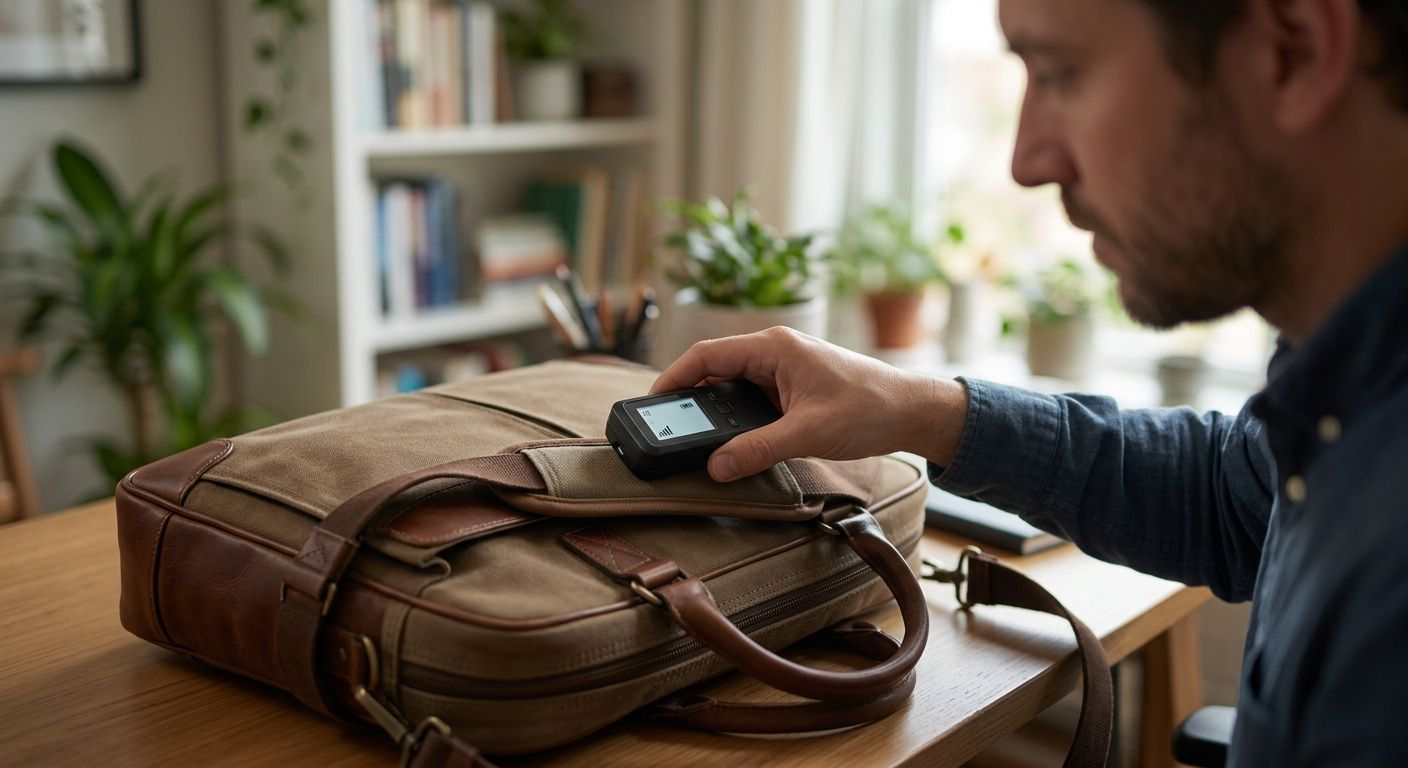
A hidden GPS tracker in a laptop bag or briefcase is almost always a small puck- or card-sized device wedged into a lining seam, a strap buckle, the laptop sleeve padding, or a false bottom panel — you find it with a hands-on physical search first, then a Bluetooth scan for AirTag-style trackers, then an RF sweep for cellular models that don't broadcast Bluetooth at all.
- Search the bag by hand first: linings, strap buckles, laptop sleeve padding, and the bottom panel hide trackers better than any exterior pocket.
- Bluetooth scanner apps catch AirTag-style trackers; cellular GPS trackers need an RF detector because they don't broadcast Bluetooth.
- A tracker adds a stiff lump or uneven weight you can feel through fabric once you know where to press.
- USA Bugsweeps runs professional TSCM sweeps in 2026 on bags, vehicles, and offices when a DIY check comes up empty but the feeling doesn't.
Why this matters
A laptop bag or briefcase travels with you into client meetings, courtrooms, competitor pitches, and your car every single day — it's a better tracking platform than a vehicle because nobody thinks to check it. Divorce attorneys, corporate investigators, and jealous partners plant trackers in bags specifically because the target searches their car and never touches the bag sitting on the passenger seat.
The device doesn't need to be sophisticated. A cellular GPS tracker the size of a matchbook, powered by a battery that lasts weeks, reports location over the same network your phone uses. It takes under a minute to hide.
How to find a GPS tracker on a laptop bag or briefcase
Work through the bag empty, in good light, on a flat table. Rushing through this with the laptop still inside is the single biggest reason people miss a tracker.
- Empty every compartment completely — laptop sleeve, pen pockets, phone slots, the works. Set the contents aside so you're only handling the bag itself.
- Run your fingers along every seam and lining looking for a section that's been re-stitched, glued, or feels stiffer than the fabric around it.
- Check the strap and handle wrap — trackers get sewn into the padding of a shoulder strap or slid under the leather wrap of a briefcase handle where the extra bulk feels normal.
- Press the laptop sleeve padding from both sides. A thin, flat GPS tracker feels like a firm card sandwiched inside foam that should compress evenly.
- Check the bottom panel by pressing it against a hard surface. False bottoms and reinforced base panels are the most common hiding spot on structured briefcases.
- Inspect the luggage tag holder, business card slot, and any zippered exterior pocket for anything that doesn't belong to you.
- Run a Bluetooth scanner app (built into recent iPhones for AirTag alerts, or a third-party scanner on Android) to catch consumer trackers.
- Run an RF detector across the bag if steps 1-7 turn up nothing but the bag still feels heavier than it should — cellular trackers won't show up on a Bluetooth scan.
A USA Bugsweeps technician runs this same sequence with professional RF detection equipment when a bag needs a conclusive answer instead of a guess.
DIY check vs. professional TSCM sweep
| Method | Catches Bluetooth trackers | Catches cellular GPS trackers | Catches trackers with no active signal |
|---|---|---|---|
| Hands-on visual/physical search | Sometimes | Sometimes | Yes, if the hiding spot is found |
| Phone Bluetooth scanner app | Yes | No | No |
| Consumer RF detector | Partial | Partial | No |
| Professional TSCM sweep | Yes | Yes | Yes |
Verdict: a hands-on search plus a Bluetooth scan catches the cheap, consumer-grade trackers most people plant. A dormant or professionally hidden cellular tracker needs an RF sweep or a full TSCM inspection to rule out with confidence.
Cellular GPS trackers: look for a SIM slot and antenna wire
Cellular trackers report location over a phone network, which means they need a SIM card or embedded eSIM and a small antenna wire running along one edge of the device. They're typically thicker than Bluetooth trackers because the cellular radio and larger battery need more room.
These trackers sit silent most of the time and transmit in short bursts, so an RF detector held near the bag for several minutes has a much better chance of catching a burst than a five-second pass. If your laptop bag has a built-in USB charging port, check that circuit first — it gives a planted tracker a discreet power source to tap into.
Best for catching these: an RF detector plus a slow, patient physical search. Bluetooth apps are useless here.
Bluetooth and AirTag-style trackers: use a phone scan, not an RF detector
AirTags and similar Bluetooth trackers are flat, round, and roughly the diameter of a US quarter, and they rely on nearby phones to relay location rather than their own cellular connection. iPhones running recent iOS versions surface an unknown-item alert automatically if a tracker travels with you; Android users need a manufacturer app or a third-party Bluetooth scanner to get the same warning.
The tradeoff: Bluetooth trackers are cheap and easy to plant, but they're also the easiest to find because most phones shipping in 2026 include some form of unwanted-tracker detection. Don't stop at the Bluetooth scan — a tracker with its Bluetooth radio disabled won't ping, which is exactly why the physical search still matters after a clean scan.
Best for catching these: your own phone, in under two minutes.
Why trackers get hidden in bags instead of vehicles
- Bags travel where the car doesn't — into offices, restaurants, and other people's homes, giving continuous location data a parked car can't provide.
- Nobody checks a bag the way they check a car — most people who suspect tracking go straight to the wheel wells and never touch the bag.
- Structured briefcases have built-in cavities — reinforced bottoms and thick strap padding create hiding spots that require no cutting or visible modification.
- Daily handling doesn't dislodge it — unlike a magnetic tracker stuck under a bumper, one sewn into a lining survives months of use.
- Access is trivial — a bag left at a desk, in a car, or at a shared workspace for a few minutes is enough time to plant a device.
- Bags get carried through security and screening without anyone looking for a tracker specifically.
Can an RF detector find a GPS tracker with no active signal?
No. An RF detector only picks up an active radio transmission, so a tracker that's powered off, in deep sleep, or missing its SIM won't register on a sweep. That's why the hands-on search of seams, linings, and padding stays the first step regardless of what equipment you own.
Do AirTags show up on Android Bluetooth scanners?
Yes. Most Android Bluetooth scanner apps detect AirTag-style trackers broadcasting nearby, though built-in unknown-tracker alerts vary by manufacturer and OS version. Apple's detection is more consistent because it's built directly into iOS rather than left to individual app developers.
How often should you check a laptop bag for a tracker?
Check any time the bag left your sight. A bag you control all day needs one thorough inspection; a bag left at a repair shop, a shared office, a hotel room, or with someone you have reason to distrust needs a fresh check every time. Ten unattended minutes is enough time for a tracker to go in.
Not sure a DIY check was enough?
A professional TSCM sweep rules out active and dormant trackers in bags, vehicles, and offices.
If the bag comes up clean but the suspicion doesn't, extend the search to whatever the bag rides in — a hidden GPS tracker on your car is the next place a device usually turns up, and a dedicated GPS tracker detector for personal vehicles closes the gap a bag-only check leaves open.
FAQ
How do I find a hidden GPS tracker on a laptop bag?
Empty the bag completely and check every seam, the strap padding, the laptop sleeve, and the bottom panel by hand before using any tool. Follow with a Bluetooth scanner app for AirTag-style trackers and an RF detector for cellular models.
What does a hidden GPS tracker feel like inside a bag?
It feels like a stiff, flat card or small block sandwiched inside padding that should compress evenly on both sides. Uneven weight or a firm lump along a seam that wasn't there before is the giveaway.
Can a metal detector find a GPS tracker in a briefcase?
A metal detector picks up the battery and circuit board inside a tracker, but it cannot distinguish that from a zipper pull, buckle, or laptop charger. It is not reliable as a standalone method.
Do GPS trackers need cell service to work in a bag?
Cellular GPS trackers need cell service to transmit location data, while Bluetooth trackers like AirTags rely on nearby phones instead of their own connection. Both work inside a closed bag without you noticing.
Is it legal to remove a GPS tracker from your own bag?
Removing a tracker from a bag you own is generally legal, but rules on who placed it and why vary by state, especially in domestic disputes. Photograph and document the device before removing it in case the situation becomes a legal matter.
Will an RF detector find a tracker that is turned off?
No. An RF detector only catches active radio transmissions, so a powered-down or sleeping tracker will not register. A physical search of the bag's linings and padding is the only way to catch a dormant device.
How much does a professional bug sweep for a bag cost in 2026?
Pricing varies by provider and scope, so request a current quote directly from a TSCM service in 2026. Sweeps for a single item like a bag are usually scoped separately from full-vehicle or full-office sweeps.
Can a laptop bag tracker also record audio?
Some combination devices pair a GPS tracker with a microphone, though a standalone GPS unit only transmits location. A physical inspection plus an RF sweep catches both types, since either one needs a working radio to be useful.
One last thing
The hiding spot most people skip is the laptop sleeve's own padding, not the exterior pockets. A flat cellular tracker slides between the foam layers of a sleeve and rides against your laptop for weeks without adding visible bulk to the outside of the bag. Press that sleeve from both sides before you call the bag clean in 2026.


