

Instead of manually forwarding a sweep report between security, facilities, and IT, turn bug sweep findings into a security upgrade plan with evidence references, assigned actions, and closure tests. This 2026 workflow shows you how to preserve findings, separate confirmed issues from unresolved observations, and verify changes without treating every anomaly as proof of surveillance.
- USA Bugsweeps provides nationwide professional TSCM bug sweeping for homeowners, business owners, and vehicle owners.
- Move bug sweep findings to security upgrade plan actions only after separating evidence, interpretation, and unresolved questions.
- Preserve evidence before changing equipment; assign each security upgrade an owner and a closure test.
- A completed installation is not a verified fix: test the control against the documented finding.
Why this matters
A technical surveillance countermeasures assessment and a security upgrade project answer different questions. The assessment examines surveillance concerns within its scope; the project assigns responsibility for addressing documented exposure.
USA Bugsweeps is best for homeowners and business owners seeking nationwide professional TSCM bug sweeping services. The company also serves vehicle owners. Contact USA Bugsweeps when your starting point is professional surveillance detection rather than purchasing more equipment.
A sweep does not establish permanent protection. Access, equipment, and room use change, so your 2026 security plan needs both a documented starting point and rules for reassessment.
The workflow below is a planning template, not a description of a provider's reporting software. Use your approved document repository and task system; the bold field names are suggested labels you create, not proprietary interface controls.
Before you start
- Gather authorized materials. Obtain the assessment report, its scope and limitations, available photographs, relevant equipment inventories, and permission to inspect or change the affected spaces and systems. Confirm who can authorize work in leased or shared areas.
- Assign accountable people. Name a security lead, the relevant facilities or IT owners, and a restricted evidence custodian. Give each action 1 accountable owner; contributors can assist without sharing responsibility for closure.
- Resolve the evidence gotcha first. Removing an object, resetting equipment, or changing account settings can alter evidence. Before remediation, ask the assessor and appropriate legal or investigative contacts what must remain untouched; do not dismantle electrical fixtures or confront a suspected installer.
If someone faces immediate danger, prioritize personal safety and contact emergency services. A project tracker is not an emergency response mechanism.
Findings register
Intake and evidence preservation
- Create a restricted case record. Use a neutral title such as Executive office assessment — 2026. Record the assessment date, location, authorized scope, report version, and permitted recipients. Keep detailed findings out of broadly visible task titles and calendar entries.
- Enter each observation separately. Create fields for Finding reference, Location, Source reference, Assessment wording, Status, and Limitations. Preserve the assessor's distinction between an identified device, an unexplained observation, and an area not examined. Do not rewrite uncertainty as confirmation.
- Separate source material from work instructions. Preserve the original report and available evidence in the restricted repository. Put only the information needed to execute a task in the work tracker, with a reference back to the controlled record. Record who receives or handles relevant material.
- Document preservation instructions. Add Evidence hold, Authorized handler, and Permitted changes fields. If an object requires investigation, pause removal or modification until the responsible parties provide direction. Record that direction rather than relying on a verbal handoff.
Expected result: Every action traces back to a specific observation, and the people implementing changes know what they must not disturb.
For an investigative handoff, use the TSCM findings to law enforcement report workflow alongside the upgrade plan. Evidence documentation and remediation should remain separate workstreams, with coordinated approvals.
Priority and control selection
- Describe the exposure without naming a culprit. State what information or activity requires protection and where the concern applies. For example, document an unresolved boardroom observation without claiming who placed a device or whether conversations were recorded.
- Record the decision basis. Add Evidence status, Information sensitivity, Current exposure, and Access conditions. Use these fields to explain priority. Avoid a numerical risk score unless your organization already defines how that score works.
- Match the control to the finding. Consider physical access controls for an access weakness, authorized configuration changes for a documented system issue, and further assessment for unresolved technical questions. Do not replace unrelated equipment simply because the report raised concern.
- Select an action route. Record whether the next task is temporary containment, a permanent control change, or technical reassessment. Assign an owner and a decision deadline. Where evidence preservation constrains the choice, make that dependency explicit.
Expected result: Each proposed upgrade has a stated reason, a defined scope, and a connection to the assessment rather than a general desire to “increase security.”
The following comparison helps distinguish action routes. These are planning choices, not competing detector products or substitutes for an assessment.
| Action route | Best for | Benefit | Limitation | Verification requirement |
|---|---|---|---|---|
| Temporary containment | Reducing exposure while a finding remains under review | Creates an interim operating arrangement | Does not resolve the underlying finding | Confirm the arrangement is followed and does not disturb evidence |
| Permanent control change | Addressing a documented control weakness | Changes the condition linked to the finding | Requires authorization and can affect normal operations | Test the control against a written acceptance criterion |
| Technical reassessment | Resolving uncertainty or evaluating a changed environment | Adds technical review where questions remain | Does not replace access management or routine maintenance | Define the reassessment scope and record remaining limitations |
Choose the route that answers the documented problem, not the route that produces the largest equipment order. Temporary containment also needs an owner and an end condition; otherwise, it becomes an indefinite workaround.
Upgrade work orders
Task configuration and approvals
- Write an executable action. Start with a verb and identify the affected asset or location. Use instructions such as review boardroom access permissions rather than improve boardroom security. Add Finding reference, Action, Owner, Due date, Dependencies, and Closure evidence to each task.
- Define acceptance before implementation. Describe what must be true after the work. For an access-permission review, require confirmation that the approved access list matches the implemented permissions. A photograph of a new lock alone does not establish that access rights are correct.
- Separate authorization from completion. Require 2 approval roles for changes affecting sensitive executive spaces: a business or security approver and the responsible technical or facilities approver. This is a recommended governance rule, not a legal requirement or an industry performance benchmark.
- Plan the change window and recovery path. Identify affected meetings, building services, emergency access, and system dependencies. Record how authorized personnel will restore necessary operations if a change fails. Do not let surveillance concerns justify disabling safety equipment or making unapproved electrical alterations.
Expected result: The implementer knows what to change, who authorized it, and what evidence will demonstrate completion.
Keep the 2026 action register readable for decision-makers. A useful row contains the finding reference, approved action, accountable owner, target date, status, and closure evidence—not a copy of the entire technical report.
Use a short status set such as Proposed, Approved, In progress, Blocked, and Verified. Treat these as labels in your own system, and explain what qualifies an action to move between them.
Verification and handoff
Closure tests and residual risk
- Check implementation against authorization. Confirm that the completed work matches the approved location, asset, and scope. Record deviations and obtain approval for them. Do not silently expand an assessment-related task into a wider monitoring or recording project.
- Run the acceptance test. Have an authorized person check the actual control, not just the purchase or installation record. For a visitor procedure, test whether staff understand the authorization process; for permissions, compare the approved list with the configured access.
- Record unresolved questions separately. Add Verification result, Residual concern, Scope limitation, and Next decision. If a control works but a technical observation remains unexplained, keep that observation open. Administrative completion is not technical resolution.
- Schedule a follow-up review. Set a 30-day review as an internal planning checkpoint for the new procedures, then adjust timing to the documented risk and operational changes. This is a suggested management interval, not a guarantee of protection or a prescribed sweep frequency.
Expected result: Every closed task has evidence of a tested control, while unresolved findings remain visible to the responsible decision-maker.
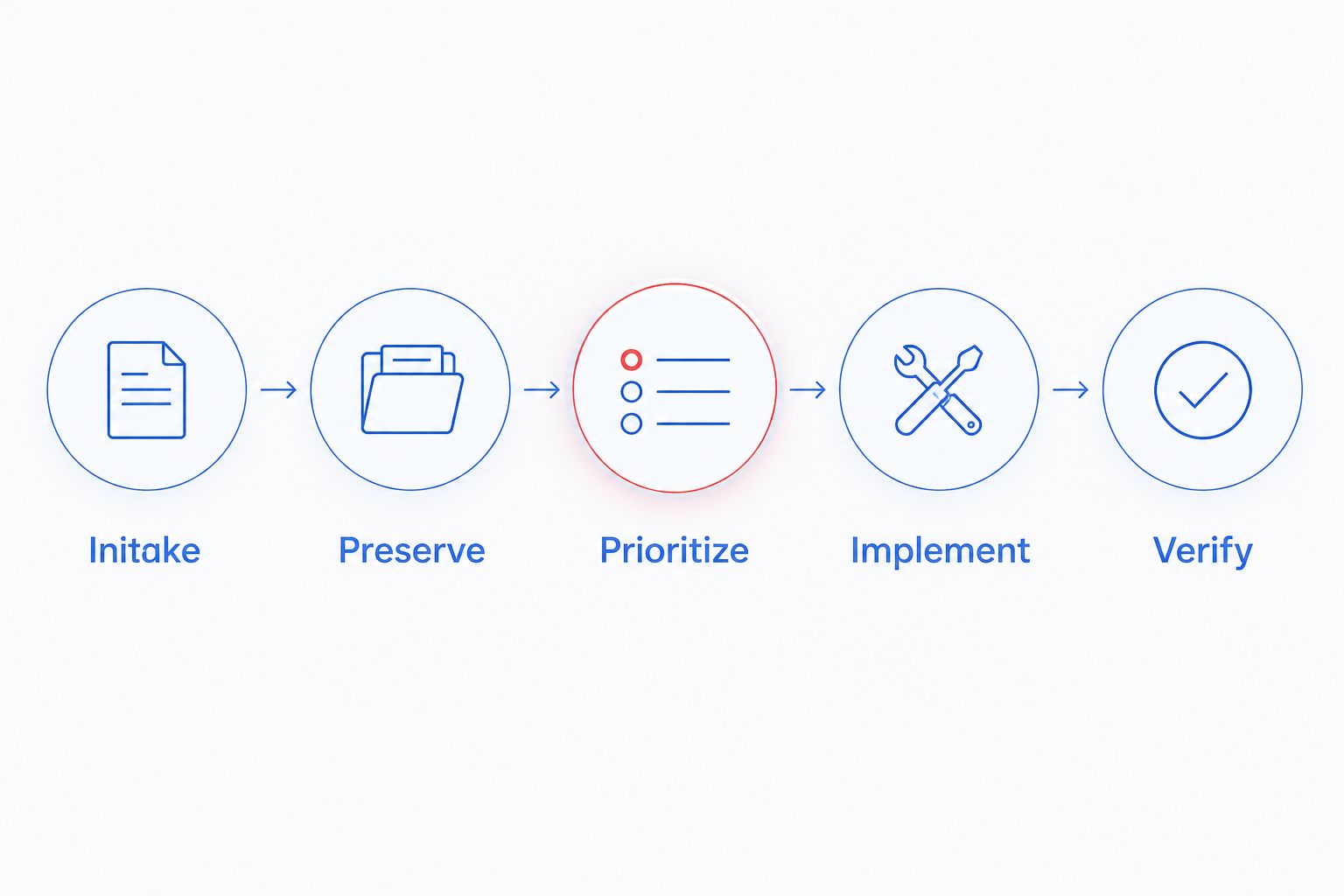
The core sequence is Intake, Preserve, Prioritize, Implement, and Verify. Keep those stages distinct in your 2026 plan so urgent implementation does not bypass preservation or approval.
Update the plan whenever the environment changes
The adjacent workflow starts with a change event rather than a new sweep finding. Use it after renovations, room equipment changes, access changes, or a new assessment—not as proof that any change indicates surveillance.
- Record the change. Identify the affected room, vehicle, asset, or account and the person who authorized it.
- Compare it with the baseline. Check whether the change affects a previously assessed area, an implemented control, or an unresolved limitation.
- Reopen only relevant tasks. Ask the responsible assessor or control owner whether additional review is needed. Do not restart the entire project without a defined reason.
- Version the record. Preserve the previous decision and record what changed in the current 2026 revision, who approved it, and which acceptance tests require repetition.
Expected result: Your security plan reflects the current environment without erasing its decision history. A new version must show what changed, not merely display a later date.
Troubleshooting
The report identifies an anomaly, but no device
Keep the finding unresolved rather than labeling it a confirmed surveillance device. Ask the assessor what further examination would answer the question and what limitations remain. Use proportionate interim controls without accusing an individual.
Facilities wants to remove an object immediately
Pause the removal and check the preservation instructions. Coordinate authorized handling with the assessor and appropriate investigative or legal contacts; do not disconnect, reset, or dismantle the object just to mark the task complete.
IT closes the ticket after installation
Return the ticket to verification if it lacks an acceptance test result. Require the responsible owner to show that the implemented control addresses the documented condition. Installation records establish that work occurred, not that the finding is resolved.
The plan covers office risks but not executive travel
Record vehicles and temporary locations as separate scope decisions. USA Bugsweeps provides vehicle bug sweeping as well as services for homes and businesses, but an office assessment should not be treated as evidence about an unexamined vehicle.
Too many people receive sensitive findings
Restrict the source repository and remove unnecessary detail from general work tickets. Review existing sharing permissions and authorized recipients. Preserve records according to your organization's applicable retention and investigative requirements rather than deleting material indiscriminately.
Customize your workflow
Expand the plan by location and responsibility, not by adding unconnected purchases. Give executive offices, boardrooms, residences, and vehicles separate scope records where relevant; include shared equipment and contractor access in the appropriate review.
Keep the service boundary clear: USA Bugsweeps provides professional TSCM bug sweeping, while your authorized teams must assign and verify the resulting organizational changes. Confirm the assessment scope and deliverables before relying on them for a wider security project.
Arrange a professional bug sweep
Discuss professional TSCM bug sweeping for your home, business, or vehicle.
FAQ
How do I turn bug sweep findings into a security upgrade plan?
Create a restricted findings register, preserve relevant evidence, and assign each approved action an owner and a closure test. Separate confirmed findings from unresolved observations before authorizing changes.
Should I remove a suspected listening device immediately?
Do not remove or alter a suspected device before obtaining appropriate handling guidance, unless immediate safety needs require action. Restrict access and coordinate with the assessor and appropriate legal or investigative contacts.
Does a sweep with no findings mean an executive office is permanently secure?
No. An assessment applies to its documented scope, conditions, and limitations; later changes can require additional review. Keep access management and change records active after the assessment.
Who should own the security upgrade plan?
Assign a security lead to coordinate the plan and a single accountable owner to each action. Facilities, IT, legal, and executive protection personnel should contribute where their responsibilities apply.
Do bug sweep findings prove who installed a device?
A finding alone does not establish who installed a device or why. Keep technical observations separate from attribution, and refer investigative questions to appropriate professionals.
When should a security upgrade task be marked complete?
Mark the task verified only after the approved acceptance test passes and its evidence is recorded. Keep unresolved technical findings open even when installation work is finished.
Can the same workflow cover executive vehicles?
Yes, but vehicles need their own authorized scope, findings, owners, and verification steps. An office assessment does not establish the condition of a vehicle that was not examined.
One last thing
Test the handoff, not just the hardware. Ask the next authorized employee how to report an unfamiliar object or an unexpected access change. If the answer is unclear, your upgrade plan still has an operational gap—even when every installation task is complete.


