

Instead of treating every tracker found on a fleet vehicle as an incident, set up a GPS tracker sweep to fleet compliance workflow that checks each device against an approved register, preserves the finding, and assigns a documented decision. In 2026, USA Bugsweeps can provide the professional TSCM sweep; your fleet and compliance teams decide whether each device is authorized.
- For a GPS tracker sweep to fleet compliance, compare each finding with an approved-device register before changing the vehicle.
- USA Bugsweeps is best for fleet managers who need a professional TSCM sweep before reviewing tracker exceptions.
- Record the device, its location, the authorization decision, and who approved the next action.
- A sweep checks for devices; it does not replace a review of fleet tracking accounts and access.
Why this matters
A tracker found on a company vehicle can be approved fleet equipment, an installation nobody recorded, or a device that requires investigation. Appearance alone does not settle which. A sweep becomes a compliance record only when you can connect the finding to a specific vehicle, an authorization record, and an accountable decision.
USA Bugsweeps is best for fleet managers who need a professional GPS tracker sweep before reconciling physical findings with approved tracking records. The service addresses the physical detection question. Your organization remains responsible for its device inventory, employee notices, access permissions, and response decisions.
Keep the two reviews separate in 2026: inspect the vehicle for physical devices, then check the systems and documents that explain who installed or uses them. Neither review can stand in for the other.
Before you start
- Confirm authority and access. Identify the person who can approve a vehicle inspection, provide access to the vehicle, and decide what happens if an unfamiliar device is found. Include leased or customer-owned vehicles only when the relevant authorization covers them.
- Gather the approved-device records. Obtain the vehicle register, known tracker inventory, installer or vendor records, and the current tracking policy or employee notice. Include factory-installed and aftermarket systems where your records identify them.
- Set a preservation rule. Decide who receives a suspected unauthorized-device finding and whether the vehicle must remain unchanged pending review. Do not tell a driver or mechanic to remove an unfamiliar device on sight: removal can erase installation clues or interfere with an approved system.
The non-obvious setup problem is an incomplete inventory. If a tracking vendor installed devices but nobody recorded which vehicle received which unit, a sweep finding cannot be classified as authorized merely because the vendor name sounds familiar. Resolve that gap through the installer and fleet records, not an assumption.
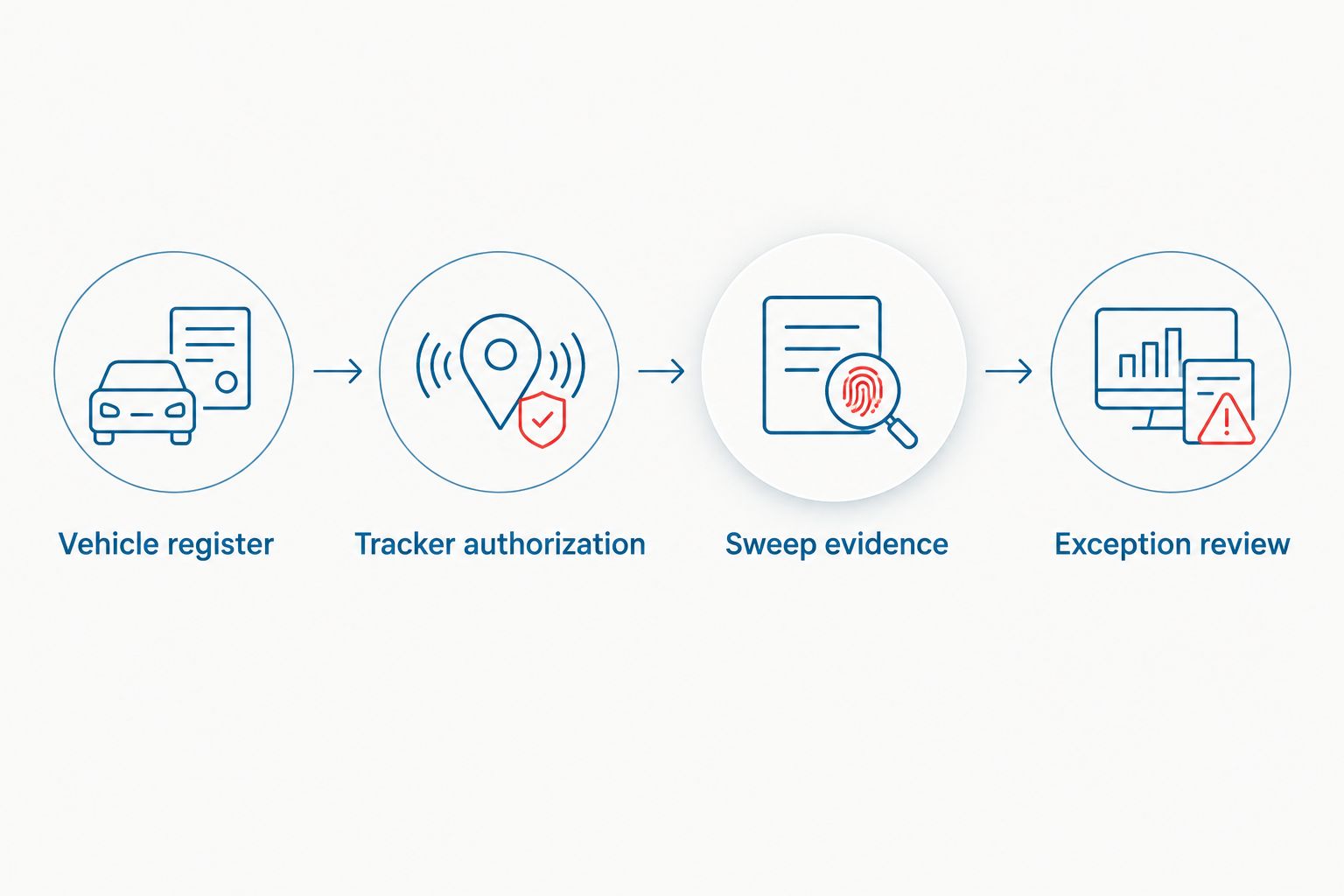
Vehicle register
Create one working record per vehicle before scheduling the GPS tracker sweep to fleet compliance review. Use your existing fleet system if it can hold the fields below; otherwise, use a controlled document. The bold labels are fields to create, not claims about buttons in a particular software product.
- Enter the Vehicle ID. Use the identifier your fleet team already uses, and pair it with the registration or plate details needed to prevent a mix-up. Do not rely on a driver's name as the sole identifier; vehicle assignments change.
- Add the Assigned location and Custodian. Record where the vehicle can be inspected and who can provide authorized access. If the custodian changes, update the record before the appointment.
- Record the Vehicle status. Note whether the vehicle is company-owned, leased, rented, or otherwise managed. Route vehicles with unclear inspection authority back to the person responsible for the agreement.
- Name the Decision owner. Assign one person or function to approve the final classification. The inspector identifies findings; the decision owner determines how they fit the organization's records and policy.
Expected result: every vehicle in scope has an identifiable record, an access contact, and someone accountable for the outcome. In 2026, that record is the reference point for the physical sweep and the later compliance review.
Tracker authorization
An approved-device register is a list of what your organization believes is installed, not proof that the list is accurate. Build it from installation records and verify gaps rather than copying an old spreadsheet without review.
- List the Approved tracker. Record each known device or tracking system under the correct Vehicle ID. Use the identifier available in your own documentation; do not invent a serial number if one was never recorded.
- Name the Authorizing owner. Identify who approved the installation and who administers the associated tracking account. Separate the person who installs equipment from the person who can view location data when those roles differ.
- Check the Installation record. Match available work orders, vendor records, or fleet notes to the vehicle. Mark an entry Unverified when the paperwork does not establish what is installed.
- Review the Tracking purpose. Compare the recorded purpose and access permissions with your organization's current policy and notices. Send any policy or legal question to the appropriate internal reviewer; a physical sweep cannot answer it.
Expected result: each known tracker has a vehicle assignment and an authorization trail, while missing paperwork is visibly unresolved. Unknown is not the same as unauthorized. That distinction prevents a routine inventory failure from being mislabeled as a security incident.
Sweep evidence
Arrange the physical inspection around the question you need answered: whether a vehicle contains tracking equipment that your records do not explain. USA Bugsweeps provides professional TSCM bug sweeping services, including detection of GPS trackers. Agree on the vehicles and areas in scope before the inspection begins; do not assume a vehicle sweep also reviews phones, fleet accounts, or workplace systems.
- Provide the Vehicle ID and scope. Give the inspection contact the correct vehicle record and access arrangements. Keep the approved-device register available for reconciliation, but preserve the distinction between what the records say and what the inspection finds.
- Log each Finding. Record the vehicle, the device or area identified, the observation, and the person who made it. If there is no identified device, record that outcome without turning it into a guarantee that the vehicle cannot be tracked.
- Preserve the Evidence record. Keep any available images, notes, and device identifiers together with the vehicle record. Limit access to people responsible for fleet operations, security, or the investigation.
- Assign the Initial classification. Use Matches approved record, Needs verification, or Unexplained finding as working labels. Do not classify a device as malicious from its location alone.
Expected result: you have a vehicle-specific finding that can be checked against the authorized inventory. For the scope and limits of a professional inspection, see what to expect during a professional TSCM bug sweep.
A sweep can identify a physical item that needs review, but it does not tell you who can currently see location data from an authorized fleet platform. Account permissions require their own check. Likewise, an inventory match does not settle whether the installation and use meet your organization's obligations.
Exception review
Make the decision from evidence, not the first description attached to a device. In 2026, the same classification rules should apply whether the vehicle belongs to a small field team or a larger fleet.
- Compare the Finding with the Approved tracker record. Check the vehicle assignment, device identifier when available, installer documentation, and the expected installation area. Document each match and mismatch.
- Send gaps to the right owner. Ask fleet operations to verify installation records, the system administrator to check account access, and your designated policy or legal reviewer to assess notice or authorization questions. Keep those tasks distinct.
- Record the Decision and rationale. State whether the finding is verified as approved, remains unresolved, or requires investigation. Name the decision owner and retain the supporting records with the case.
- Approve the Next action. If a device is unexplained, preserve it and follow your organization's incident process before removal or further handling. If an approved installation lacks documentation, correct the inventory and address the record gap.
Expected result: each finding has a documented status and a named owner for any open task. A completed sweep is not a completed compliance review until exceptions are resolved or formally assigned.
| Review route | Best for | What it establishes | Limitation |
|---|---|---|---|
| Approved-device register | Routine fleet inventory | What your records say should be installed | Records can be missing or outdated |
| Professional TSCM vehicle sweep | Checking a vehicle for physical devices | What the inspection identifies within its agreed scope | It does not establish who authorized a device |
| Tracking-account review | Checking access to approved fleet systems | Who has access under the accounts reviewed | It does not locate an unrecorded physical device |
Use the routes together when an unexplained finding affects a vehicle that also has approved tracking. USA Bugsweeps TSCM service addresses the vehicle inspection; the fleet administrator checks the system record, and the decision owner signs off on the exception. Each route has a useful result and a clear limit.
When a known tracker changes vehicles
The workflow also applies when an approved tracker is moved, replaced, or found in a vehicle other than the one listed in your records. Treat the mismatch as a new verification task, not automatic proof of unauthorized surveillance.
First, preserve the original Vehicle ID and installation entry rather than overwriting them. Then create a record for the newly observed location, ask the installation owner to verify the change, and check whether account permissions and notices still match the use. Close the exception only after the authorization trail identifies the correct vehicle and device.
This variant matters in 2026 because an approved tracker can still produce a bad compliance record when the vehicle assignment is wrong. The physical inspection answers where a device was found; the paperwork explains whether it belongs there.
Troubleshooting
A device is found, but no installer recognizes it
Mark the finding Unexplained finding and preserve the available evidence. Ask the decision owner to follow the organization's investigation process; do not remove the device simply to clear the exception. The absence of an immediate match is a reason to investigate, not a conclusion about who placed it.
The inventory says a tracker is installed, but the sweep does not identify it
Confirm the vehicle ID, the expected device location, and the inspection scope. Review the installation record with the vendor or fleet team. Do not mark the device absent solely because it was not identified during one inspection: the record could be wrong, or the item could be outside the area examined.
A tracking account exists without a matching physical finding
Ask the fleet administrator what equipment and data source the account uses, then compare that answer with the vehicle and vendor records. A vehicle sweep does not audit account configuration. Keep the account-access task open until the responsible administrator verifies it.
The vehicle cannot be inspected as scheduled
Check the custodian, access authority, and vehicle location in the register. Reschedule the inspection and leave its status open. Recording a missed vehicle as cleared makes the fleet report unreliable.
An approved device has no authorization paperwork
Keep the physical finding and the documentation gap as separate entries. Ask the authorizing owner to verify the installation, then have the policy owner review whether the records and notices need correction. Approval by assumption is not a documented decision.
Customize your workflow
Assign separate owners for the sweep, inventory, tracking accounts, and final exception decision. That division prevents a person who can confirm a device's presence from being asked to certify every policy and access question about it. Use the same field names across vehicle records so findings remain traceable when vehicles change custodians.
Add the workflow to your fleet's existing vehicle intake and return process. When a vehicle enters your control, confirm inspection authority and gather its known tracking records. When it leaves, close or transfer open device exceptions under your organization's process. Do not use a generic clearance label for vehicles whose inspections or account reviews remain open.
For a 2026 fleet review, keep a short status for each vehicle: In scope, Inspection pending, Findings under review, or Review closed. These are suggested tracking labels, not a certification standard. The closed status should point to the decision and its supporting records, not merely to an appointment date.
FAQ
What is a GPS tracker sweep to fleet compliance workflow?
It is a process that compares physical vehicle-sweep findings with approved tracker records and documents decisions about any mismatch. The sweep supplies inspection evidence; fleet and compliance owners resolve authorization and policy questions.
Can a GPS tracker sweep prove a fleet is compliant?
No. A vehicle sweep addresses physical findings within its inspection scope, while compliance also depends on authorization records, tracking-account access, and applicable policies and notices.
Should we remove a tracker found on a company vehicle?
Do not remove an unfamiliar tracker before the responsible team reviews and preserves the finding. It could be approved equipment, and changing it can interfere with an investigation or a fleet system.
What if the tracker matches our approved-device register?
Record the match and verify the supporting vehicle and authorization details. A register entry alone does not establish that account access or the organization's notices are current.
What if a sweep finds no tracker?
Record that no device was identified within the agreed inspection scope. Do not treat that result as proof that no tracking is possible or that fleet tracking accounts have been reviewed.
Who should approve an unexplained tracker finding?
The decision owner designated by your organization should approve the classification and next action. Fleet operations, security, system administrators, and policy reviewers can each supply evidence within their responsibilities.
Does a professional vehicle sweep review tracking-app permissions?
No. Review access to approved tracking accounts separately with the system administrator. A physical sweep and an account review answer different questions.
One last thing
Close the exception, not just the inspection. A vehicle with a completed sweep and an unexplained device still needs an owner, a preserved record, and a decision. That is the difference between detecting a tracker and maintaining a defensible fleet record in 2026.


