
To check if your baby monitor has been hacked, review its account activity and shared users, watch for camera movement you did not trigger, and check whether your router shows unfamiliar access. None of those signs alone proves an intrusion: automatic tracking, another authorized user, or a connection fault can look similar. If you find an unrecognized login or viewer, disconnect the monitor from the internet, preserve what you can see, and secure the account before reconnecting it.
- In 2026, how to check if your baby monitor has been hacked starts with account access, not the camera light.
- An unfamiliar login or shared user is stronger evidence than static, blinking lights, or camera movement alone.
- A non-Wi-Fi monitor avoids cloud-account access but its wireless signal may still be intercepted nearby.
- USA Bugsweeps is best for homeowners who suspect a separate hidden camera or audio bug, not just a compromised monitor account.
Why this matters
A baby monitor can expose video or audio from a room where your family expects privacy. The right response depends on what is actually wrong. A stolen app password calls for account and device security changes; a separate recording device in the room calls for a physical search.
Start with the monitor you already know is there. If your concern extends to other connected devices, check whether your home Wi-Fi router has been compromised. A router problem changes what you need to secure, but an unfamiliar device in a router list is not, by itself, proof that someone accessed the nursery.
How to check if your baby monitor has been hacked
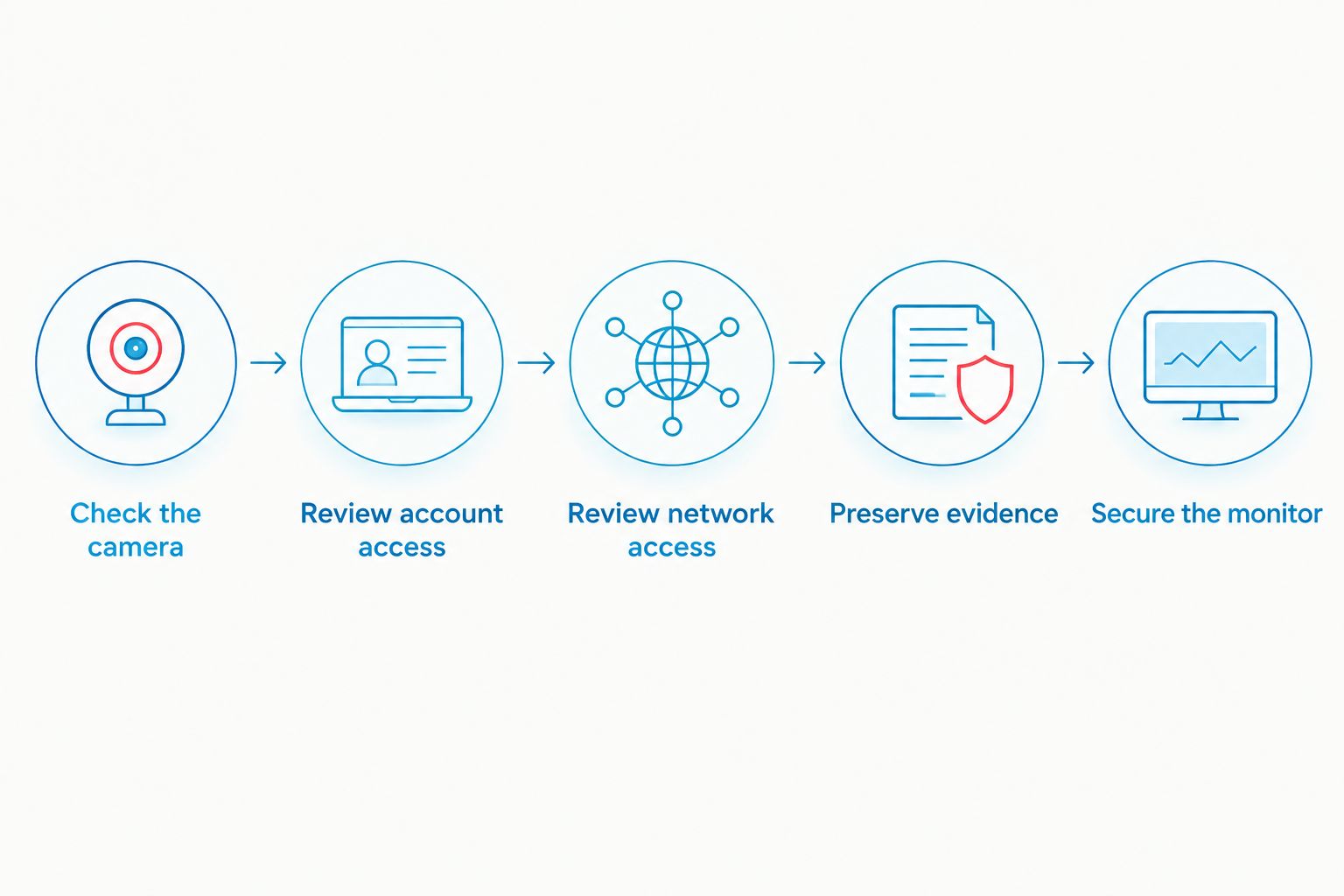
Follow this sequence in 2026. It separates suspicious behavior from evidence of unauthorized access and gives you a way to act without erasing useful information first.
- Check the camera. Close the monitor app on your phone and ask anyone who shares access to close theirs. Then watch for movement, a change in camera angle, or audio from the speaker that nobody in your household initiated. Check the monitor's settings before treating movement as evidence; some cameras move automatically to follow motion or return to a saved position.
- Review account access. Open the manufacturer's app and look for signed-in devices, shared users, recent activity, and security notifications. These features differ by model. If the app does not show login history, check the email account used to register the monitor for new-device alerts or password-change notices, and ask the manufacturer what account activity it can provide.
- Review network access. In your router's device list, identify the monitor and look for devices you do not recognize. Compare names or hardware identifiers with equipment you own before drawing a conclusion: device names can be vague, and a phone can appear under a different identifier than you expect. If you suspect someone knows the Wi-Fi password, review the router's security settings as well as the monitor account.
- Preserve evidence. If you see an unknown shared user, login alert, or unexplained account change, take screenshots showing what the app displays. Record when you noticed it. Do this before removing users or resetting the monitor, unless you need to disconnect it immediately to protect privacy.
- Secure the monitor. Disconnect it from the internet if you suspect someone is watching. From a device you trust, change the monitor account password to a unique one, remove access you do not recognize, sign out other sessions if the app allows it, and turn on multifactor authentication if available. Install firmware through the manufacturer's official app or instructions before reconnecting the monitor.
The order matters. An unfamiliar account session deserves action; a blinking indicator light deserves investigation. A light can reflect normal operation or a connection attempt, and its meaning varies by model. Check the manual rather than assuming it proves someone is watching.
If the app offers no activity history, that is a limit on what you can verify from home. A clean router list does not establish that a cloud account is secure, either: the monitor may connect normally to its provider while someone else signs in through the provider's app.
What counts as stronger evidence?
An alert for a sign-in you did not make, a shared user you did not add, or an account setting changed without your permission points to unauthorized account access. Keep the alert or screenshot, then secure the account. If another authorized caregiver uses the app, confirm their activity before treating a familiar session as an intrusion.
Unexpected camera movement and voices through the speaker need immediate attention, especially when nobody with access can explain them. They still need context. An app left open on another household device can account for activity, while ordinary interference or audio feedback can account for strange sounds. Do not use a single symptom as proof, and do not ignore a pattern you cannot explain.
Which type of monitor do you have?
The connection type determines which checks can answer your question. A Wi-Fi monitor with an account has a different exposure from a dedicated monitor that does not connect to the internet.
| Monitor type | What you gain | What you need to check |
|---|---|---|
| Wi-Fi monitor with cloud access | Viewing through an account when you are away from home | Account access, shared users, firmware, and home-network security |
| Wi-Fi monitor used only on a local network | Viewing over your home network without relying on remote account access | Router access, connected devices, monitor settings, and firmware |
| Dedicated non-Wi-Fi wireless monitor | No cloud account for a remote attacker to sign into | Physical access and the possibility of nearby wireless interception |
Best for remote viewing: a Wi-Fi monitor with a well-secured account. Its drawback is another account you must protect. Best for avoiding cloud-account exposure: a dedicated non-Wi-Fi monitor. Its drawback is that wireless does not mean private against every nearby listener; security depends on the model's transmission method. A local-network Wi-Fi monitor reduces reliance on remote access, but it still needs a secure router.
Why the warning signs vary
The same behavior can have different causes. Use these checks to narrow down what happened rather than applying every fix to every monitor.
- Camera settings: Motion tracking or preset positions can explain a camera that moves without a person touching it.
- Shared access: Someone else in your household may have the app open or may have adjusted the camera. Check who has permission before removing an unfamiliar-looking session.
- Connection problems: A monitor reconnecting to Wi-Fi can change its indicator light or produce an alert. Check what the manufacturer's instructions say that light means.
- Account features: Some apps show sessions and shared users; others provide limited account history. The absence of a visible login record is not proof that no login occurred.
- Monitor design: A non-Wi-Fi unit will not have cloud-account activity to inspect. Its privacy questions concern local wireless transmission or physical access instead.
- Other devices: Finding an unfamiliar object in a nursery is a different issue from a hacked monitor. Securing the monitor account will not identify a separate camera or recorder.
These distinctions matter in 2026 because changing a password fixes only the access that password controls. If the router is compromised, secure the router. If a device was placed in the room, investigate the room. Keep those questions separate until the evidence connects them.
What should you do after finding suspicious access?
First, stop live access by taking the monitor offline. You can unplug it or disconnect it using its settings; choose the action that protects privacy immediately. If the monitor was the only way you checked on the child from another room, arrange another way to do that while it is offline.
Next, secure the account from a device you trust. Replace a reused password everywhere you used it, starting with the email account tied to the monitor if that account is also at risk. Review shared viewers and linked devices, revoke anything you cannot identify, and enable multifactor authentication where the service supports it. If the app cannot sign out other sessions, ask the manufacturer how to revoke existing access.
Then update the monitor using the manufacturer's official instructions. A factory reset can help you start with fresh settings, but it can also remove locally stored information; save relevant alerts and account details first if it is safe to wait. After reconnecting, confirm the account has only the viewers you intend to authorize. If the monitor continues acting unexpectedly, contact the manufacturer with the model and the symptoms you recorded.
A password change will not address a camera or microphone someone placed separately in the nursery. USA Bugsweeps is best for homeowners investigating a suspected hidden device beyond the monitor. Its professional TSCM bug sweeping service addresses physical surveillance concerns; it does not replace securing a compromised monitor account. Read what to expect during a professional TSCM bug sweep if that is the concern you need to investigate.
Concerned about a hidden device?
Ask about a professional TSCM sweep for suspected surveillance beyond your monitor.
Related questions
Can someone watch my baby monitor without moving the camera?
Yes. A person with unauthorized viewing access does not need to pan the camera or speak through it. Check account access and shared users even when the monitor appears to be operating normally.
Does an active light mean my baby monitor has been hacked?
No. An active light is a reason to check the monitor's documented light behavior, app activity, and authorized viewers. Its meaning depends on the model and its settings, so the light alone cannot establish who has access.
Will changing the Wi-Fi password remove an unauthorized viewer?
Not necessarily. If someone has access to the monitor's cloud account, changing the home Wi-Fi password does not revoke that account session. Secure both the monitor account and the router when you have reason to suspect both.
FAQ
How do I tell if my baby monitor has been hacked in 2026?
Check for account logins or shared users you do not recognize, then investigate unexplained camera movement or speaker activity. A single light or sound is not proof; account evidence gives you a stronger basis for action.
Can a baby monitor be hacked without Wi-Fi?
A non-Wi-Fi monitor cannot be accessed through a Wi-Fi cloud account it does not have. Its wireless transmission can still raise privacy concerns, including interception by someone nearby, depending on the model.
Should I unplug a baby monitor if I think someone is watching?
Yes, disconnect it if you suspect live unauthorized viewing. Preserve visible account alerts first only if you can do so without delaying the privacy protection you need.
Can someone access my baby monitor if they know my app password?
Yes, if that password lets them sign in and no additional authentication stops them. Change it to a unique password, review shared access, and enable multifactor authentication if the app offers it.
Does resetting a baby monitor remove a hacker?
A factory reset can clear device settings, but it does not automatically secure an account someone else can still access. Change the account password and revoke unauthorized sessions before re-pairing the monitor.
What if my baby monitor app does not show login history?
Check its shared-user list, connected devices, email security alerts, and available account settings. Contact the manufacturer to ask what sign-in information it can provide; no visible history does not prove the account is safe.
Can a bug sweep tell me who hacked my baby monitor account?
No. A TSCM sweep investigates suspected physical surveillance devices; account records and the monitor provider are the relevant sources for a suspected unauthorized login.
One last thing
In 2026, do not treat a quiet camera as a cleared camera. Check who can view it, including people you once invited but no longer intend to share access with. Removing an old authorized viewer can resolve a privacy problem without mistaking normal monitor behavior for a hack.


